语音活动检测
Streaming Sound Wave 及其派生类型,例如 Capturable Sound Wave,支持语音活动检测(VAD)。VAD 过滤传入的音频数据,仅在检测到语音时填充内部缓冲区。
该插件提供了两种 VAD 实现:
- 默认 VAD
- Silero VAD
默认实现使用 libfvad,这是一个轻量级的语音活动检测库,可在 Runtime Audio Importer 支持的所有平台和引擎版本上高效运行。
可作为扩展插件,Silero VAD 是一个基于神经网络的语音活动检测器,它能提供更高的准确性,尤其在嘈杂环境中。它利用机器学习更可靠地区分语音与背景噪声。
基本用法
要在创建声波后启用 VAD,请使用 ToggleVAD 函数:
- Blueprint
- C++
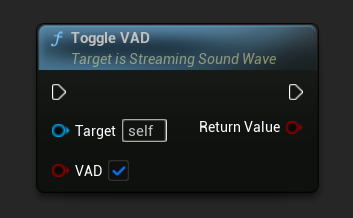
// Assuming StreamingSoundWave is a UE reference to a UStreamingSoundWave object (or its derived type, such as UCapturableSoundWave)
StreamingSoundWave->ToggleVAD(true);
启用VAD后,您可以随时重置它:
- Blueprint
- C++
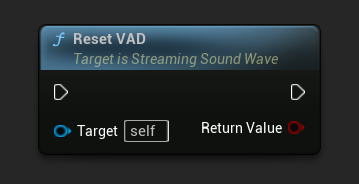
// Reset the VAD
StreamingSoundWave->ResetVAD();
默认 VAD 设置
当使用默认VAD提供程序时,你可以通过更改VAD模式来调整其激进程度:
- Blueprint
- C++
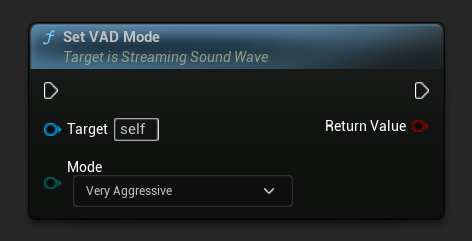
// Set the VAD mode (only works with the default VAD provider)
StreamingSoundWave->SetVADMode(ERuntimeVADMode::VeryAggressive);
mode参数控制VAD过滤音频的严格程度。较高的值更具限制性,因此它们更不可能产生误报,但可能会遗漏部分语音。
VAD 提供商
使用ToggleVAD函数启用VAD后,您可以根据需要选择不同的语音活动检测提供程序。默认提供程序是内置的,而其他提供程序(如Silero VAD)可通过扩展插件获得。
- Blueprint
- C++
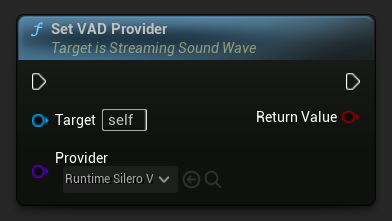
// Assuming StreamingSoundWave is a UE reference to a UStreamingSoundWave object (or its derived type, such as UCapturableSoundWave)
// Make sure to call ToggleVAD(true) before setting the provider

// Set the VAD provider to Silero VAD
StreamingSoundWave->SetVADProvider(URuntimeSileroVADProvider::StaticClass());
获取当前 VAD 提供程序
您可以使用 GetVADProvider 函数检索当前分配给流式声波的 VAD 提供程序。这在你需要访问提供程序特定的功能(例如 Silero VAD 的语音阈值设置)而无需保留单独引用的情况下非常有用。
- Blueprint
- C++
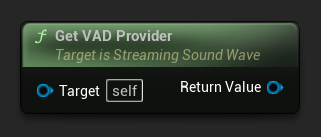
// Assuming StreamingSoundWave is a UE reference to a UStreamingSoundWave object (or its derived type, such as UCapturableSoundWave)

// Get the currently assigned VAD provider
URuntimeVADProviderBase* VADProvider = StreamingSoundWave->GetVADProvider();
要访问提供程序的特有功能,请将返回的提供程序转换为所需类型。例如,要访问 Silero VAD 的特有功能:
- Blueprint
- C++
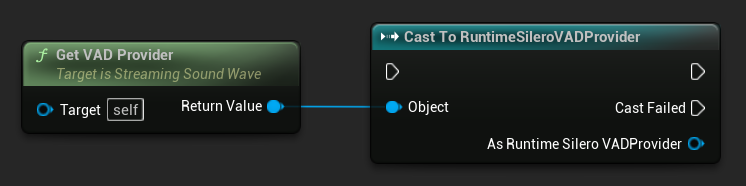
// Assuming StreamingSoundWave is a UE reference to a UStreamingSoundWave object (or its derived type, such as UCapturableSoundWave)

// Get the currently assigned VAD provider and cast it to the Silero VAD provider
if (URuntimeSileroVADProvider* SileroVADProvider = Cast<URuntimeSileroVADProvider>(StreamingSoundWave->GetVADProvider()))
{
 // Use Silero VAD-specific functionality, such as SetSpeechThreshold
}
Silero VAD 扩展
Silero VAD 通过神经网络提供更准确的语音检测。要使用它:
-
确保 Runtime Audio Importer 插件已安装在您的项目中。
-
对于 UE 5.5 及更早版本: 在下载 Silero VAD 扩展插件之前,请确保在你的项目中禁用了 NNERuntimeORT。在这些引擎版本上,启用 NNERuntimeORT 可能会在使用 Silero VAD 时因冲突导致崩溃。
-
从这里下载Silero VAD扩展插件
-
从下载的压缩包中提取文件夹到项目的
Plugins文件夹中(如果该文件夹不存在,请创建它) -
对于 UE 5.6 及更高版本:编辑
RuntimeAudioImporterSileroVAD.uplugin文件以添加 NNERuntimeORT 依赖项。在 "Plugins" 字段中,在 RuntimeAudioImporter 包含项之后,添加:,{"Name": "NNERuntimeORT","Enabled": true} -
重新构建你的项目(此扩展需要 C++ 项目)
-
默认 VAD 适用于 Runtime Audio Importer 支持的所有引擎版本(UE 4.24、4.25、4.26、4.27、5.0、5.1、5.2、5.3、5.4、5.5、5.6、5.7 和 5.8)
-
Silero VAD 支持 Unreal Engine 4.27 和所有 UE5 版本(4.27、5.0、5.1、5.2、5.3、5.4、5.5、5.6、5.7 和 5.8)
-
UE 5.5 及更早版本: 必须在使用 Silero VAD 前禁用 NNERuntimeORT,以防止因插件冲突导致崩溃。特别是在 UE 5.3 中,还必须禁用 NNERuntimeORTCpu 和 NNERuntimeORTGpu。
-
UE 5.6+ 要求: 从 Unreal Engine 5.6 开始,Silero VAD 扩展需要手动将 NNERuntimeORT 插件依赖添加到
.uplugin文件中。 -
Silero VAD 适用于 Windows、Linux、Mac、Android(包括 Meta Quest)和 iOS
-
此扩展以源代码形式提供,需要 C++ 项目才能使用
-
有关如何手动构建插件的更多信息,请参阅构建插件教程
安装完成后,您可以使用 SetVADProvider 函数并传入 Silero 类提供程序,将其选为 VAD 提供程序。
语音阈值
Silero VAD 提供者公开了一个 Speech Threshold 参数,该参数控制将音频片段视为语音所需的最低置信度分数(来自神经网络的语音概率输出)。你可以使用 SetSpeechThreshold 函数来设置它,该函数在通过 GetVADProvider 获取提供者并转换为 Silero VAD 提供者类型后可用。
- 蓝图
- C++
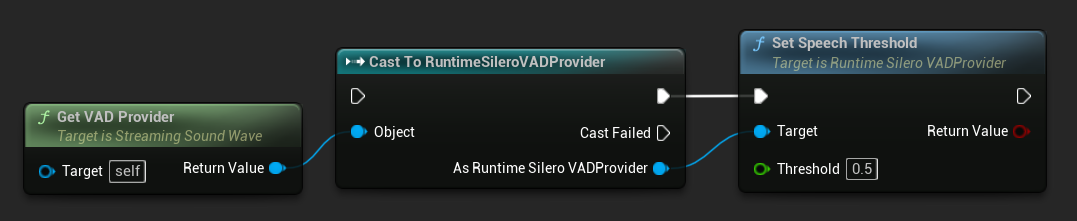
// Assuming StreamingSoundWave is a UE reference to a UStreamingSoundWave object (or its derived type, such as UCapturableSoundWave)
// Make sure the VAD provider has already been set to Silero VAD via SetVADProvider

// Get the VAD provider and cast it to the Silero VAD provider
if (URuntimeSileroVADProvider* SileroVADProvider = Cast<URuntimeSileroVADProvider>(StreamingSoundWave->GetVADProvider()))
{
 // Set the speech threshold
 bool bSuccess = SileroVADProvider->SetSpeechThreshold(0.5f);
}
SetSpeechThreshold 如果阈值应用成功,则返回 true,否则返回 false(例如,如果值超出有效范围)。
较高的阈值会使检测更保守:它能减少背景噪音带来的误报,但也可能漏掉较轻柔或不太清晰的语音。较低的阈值会使检测更灵敏:它能捕捉到更多语音,但误报的风险也会增加。默认值为0.5。
语音开始和结束检测
语音活动检测不仅检测语音的存在,还能检测语音活动的开始和结束。这对于在播放或采集过程中,在语音开始或结束时触发事件非常有用。
您可以通过调整最小语音持续时间和静音持续时间等参数,自定义语音开始和结束检测的灵敏度。这些参数有助于微调检测,以避免误检,比如拾取短暂的噪声或语音之间过短的停顿。
最小语音持续时间
Minimum Speech Duration 参数设定了触发语音开始事件所需的最低连续语音活动量。这有助于过滤掉不应被视为语音的短暂噪音,确保只有持续的语音活动被识别。Minimum Speech Duration 的默认值为 300 毫秒。
- Blueprint
- C++
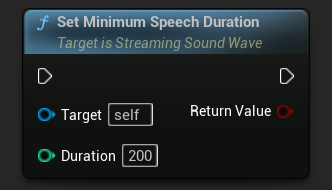
// Assuming StreamingSoundWave is a UE reference to a UStreamingSoundWave object (or its derived type, such as UCapturableSoundWave)

// Set the minimum speech duration
StreamingSoundWave->SetMinimumSpeechDuration(200);
静音持续时间
Silence Duration 参数设置了触发语音结束事件所需的静音时长。这可以防止语音检测在单词或句子之间的自然停顿中过早结束。Silence Duration 的默认值是 500 毫秒。
- Blueprint
- C++
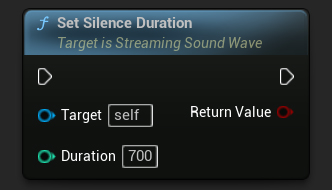
// Assuming StreamingSoundWave is a UE reference to a UStreamingSoundWave object (or its derived type, such as UCapturableSoundWave)

// Set the silence duration
StreamingSoundWave->SetSilenceDuration(700);
绑定到语音委托
你可以绑定到特定的委托,当语音开始或结束时触发。这对于基于语音活动触发自定义行为非常有用,例如开始或停止文本识别,或调整其他音频源的音量。
- Blueprint
- C++
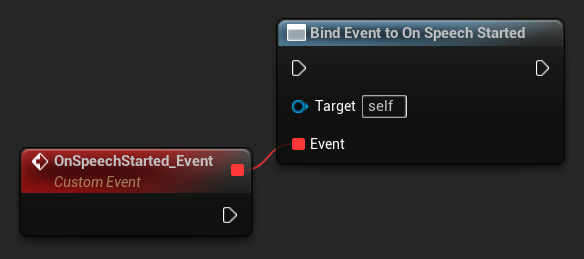
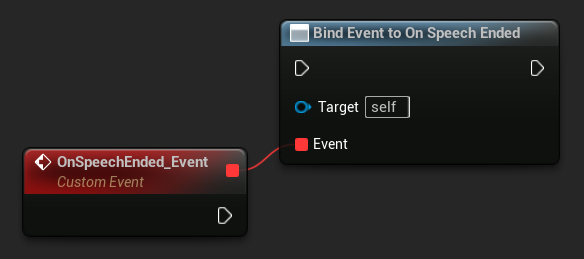
// Assuming StreamingSoundWave is a UE reference to a UStreamingSoundWave object (or its derived type, such as UCapturableSoundWave)

// Bind to the OnSpeechStartedNative delegate
StreamingSoundWave->OnSpeechStartedNative.AddWeakLambda(this, [this]()
{
 // Handle the result when speech starts
});

// Bind to the OnSpeechEndedNative delegate
StreamingSoundWave->OnSpeechEndedNative.AddWeakLambda(this, [this]()
{
 // Handle the result when speech ends
});