Pixel Streaming 音频捕获
Pixel Streaming 是 Unreal Engine 的一个插件,它通过 WebRTC 流式传输渲染帧并同步输入/输出。应用程序在服务器端运行,而客户端则处理渲染和用户交互。有关 Pixel Streaming 及其设置的更多详细信息,请参阅 Pixel Streaming 文档。
Pixel Streaming 与 Pixel Streaming 2
本插件支持 Unreal Engine 中可用的两个 Pixel Streaming 版本:
- Pixel Streaming - 原始插件,自 UE 5.2 起可用,在当前引擎版本中仍被积极使用
- Pixel Streaming 2 - 在 UE 5.5 中引入,作为具有改进内部架构的下一代实现。了解更多关于 Pixel Streaming 2 的信息
两个版本都完全支持,并在最新的 Unreal Engine 版本中可用。请选择与您项目 Pixel Streaming 设置相匹配的版本。
两个版本的 API 是相同的,唯一的区别是 Pixel Streaming 2 的类和函数名称中包含 "2"(例如,UPixelStreamingCapturableSoundWave 与 UPixelStreaming2CapturableSoundWave)。
兼容性
此解决方案适用于:
- 官方的 Pixel Streaming 基础设施(Epic Games 参考实现)
- 第三方 Pixel Streaming 提供商,包括:
- Vagon.io
- Arcane Mirage
- Eagle 3D Streaming
- 其他基于 WebRTC 的流媒体解决方案
- 操作系统:Windows 和 Linux 服务器
该实现已在上述环境中经过测试,无论使用何种 Pixel Streaming 托管解决方案,都能正常运行。
扩展插件安装
此功能作为 Runtime Audio Importer 插件的扩展提供。要使用它,您需要:
- 确保 Runtime Audio Importer 插件已安装在您的项目中
- 为您使用的 Pixel Streaming 版本下载扩展插件:
- 将下载的压缩包中的文件夹解压到您项目的
Plugins文件夹中(如果该文件夹不存在,请创建它) - 重新构建您的项目(此扩展需要 C++ 项目)
- 这些扩展以源代码形式提供,需要使用 C++ 项目
- Pixel Streaming 扩展:支持 UE 5.2 及更高版本
- Pixel Streaming 2 扩展:支持 UE 5.5 及更高版本
- 有关如何手动构建插件的更多信息,请参阅 构建插件教程
概述
Pixel Streaming 可捕获音波扩展了标准的 可捕获音波,允许直接从 Pixel Streaming 客户端的麦克风捕获音频。此功能使您能够:
- 捕获通过 Pixel Streaming 连接的浏览器中的音频
- 处理来自特定玩家/对等端的音频
- 实现语音聊天、语音命令或远程用户的音频录制
基本用法
创建 Pixel Streaming 可捕获音波
首先,您需要创建一个 Pixel Streaming 可捕获音波对象:
- Pixel Streaming
- Pixel Streaming 2
- Blueprint
- C++

PixelStreamingSoundWave = UPixelStreamingCapturableSoundWave::CreatePixelStreamingCapturableSoundWave();
- Blueprint
- C++
使用 Create Pixel Streaming 2 Capturable Sound Wave 节点(与 Pixel Streaming 相同,但名称中带有 "2")
PixelStreamingSoundWave = UPixelStreaming2CapturableSoundWave::CreatePixelStreaming2CapturableSoundWave();
您应将 Pixel Streaming Capturable Sound Wave 视为强引用,以防止其过早被销毁(例如,在 Blueprints 中将其分配给单独的变量,或在 C++ 中使用 UPROPERTY())。
开始和停止捕获
您可以通过简单的函数调用来开始和停止音频捕获:
- Pixel Streaming
- Pixel Streaming 2
- Blueprint
- C++
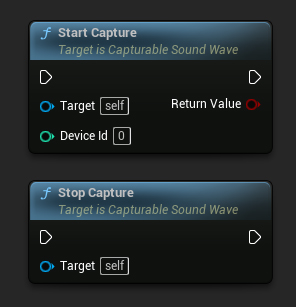
// Assuming PixelStreamingSoundWave is a reference to a UPixelStreamingCapturableSoundWave object

// Start capturing audio (the device ID parameter is ignored for Pixel Streaming)
PixelStreamingSoundWave->StartCapture(0);

// Stop capturing audio
PixelStreamingSoundWave->StopCapture();
- Blueprint
- C++
使用相同的 Start Capture 和 Stop Capture 节点来处理您的 Pixel Streaming 2 Capturable Sound Wave
// Assuming PixelStreamingSoundWave is a reference to a UPixelStreaming2CapturableSoundWave object

// Start capturing audio (the device ID parameter is ignored for Pixel Streaming 2)
PixelStreamingSoundWave->StartCapture(0);

// Stop capturing audio
PixelStreamingSoundWave->StopCapture();
StartCapture 中的 DeviceId 参数对于 Pixel Streaming 可捕获音波将被忽略,因为捕获源是自动确定的,或者由您设置的播放器信息决定。
检查捕获状态
您可以检查音波当前是否正在捕获音频:
- Pixel Streaming
- Pixel Streaming 2
- Blueprint
- C++
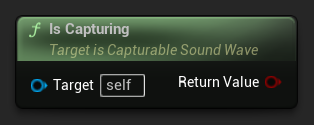
// Assuming PixelStreamingSoundWave is a reference to a UPixelStreamingCapturableSoundWave object
bool bIsCapturing = PixelStreamingSoundWave->IsCapturing();
- Blueprint
- C++
对您的 Pixel Streaming 2 可捕获音波使用相同的 Is Capturing 节点
// Assuming PixelStreamingSoundWave is a reference to a UPixelStreaming2CapturableSoundWave object
bool bIsCapturing = PixelStreamingSoundWave->IsCapturing();
完整示例
以下是如何设置 Pixel Streaming 音频捕获的完整示例:
- Pixel Streaming
- Pixel Streaming 2
- Blueprint
- C++
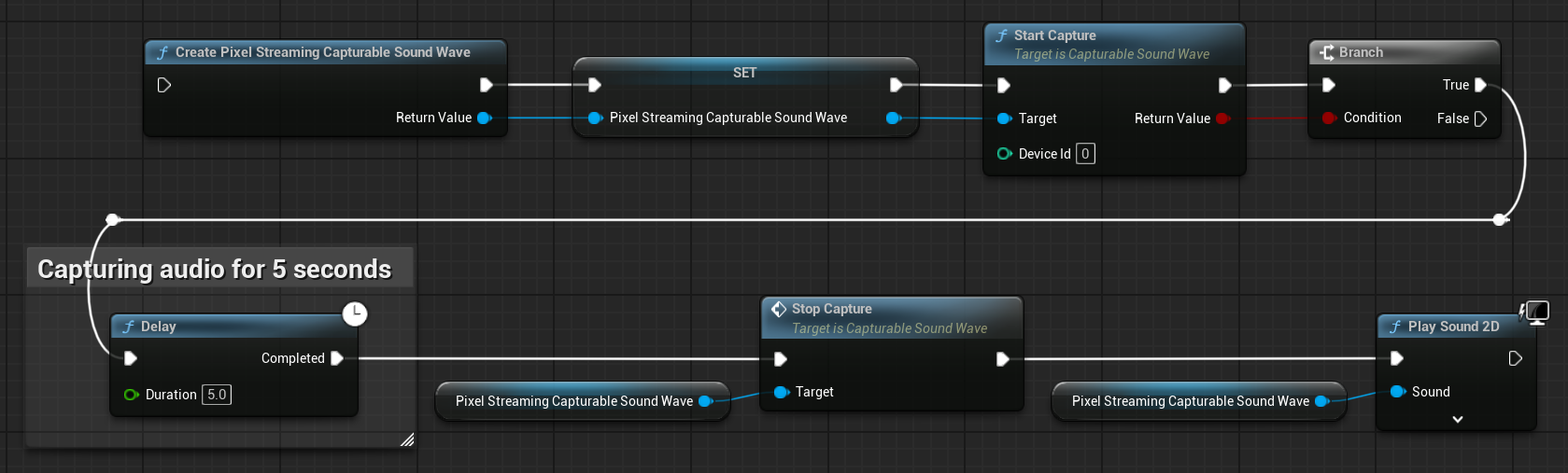
这是一个从 Pixel Streaming 客户端捕获音频数据的基础代码示例。
该示例使用了位于 EXAMPLEMODULE 模块内 UPixelStreamingAudioExample 类中的 CapturePixelStreamingAudioExample 函数。
要成功运行此示例,请确保将 RuntimeAudioImporter 和 PixelStreaming 模块都添加到 .Build.cs 文件中的 PublicDependencyModuleNames 或 PrivateDependencyModuleNames,同时也添加到您项目的 .uproject 文件中。
#pragma once

#include "CoreMinimal.h"
#include "UObject/Object.h"
#include "PixelStreamingAudioExample.generated.h"

UCLASS(BlueprintType)
class EXAMPLEMODULE_API UPixelStreamingAudioExample : public UObject
{
	GENERATED_BODY()

public:
	UFUNCTION(BlueprintCallable)
	void CapturePixelStreamingAudioExample();

private:
	// Keep a strong reference to prevent garbage collection
	UPROPERTY()
	class UPixelStreamingCapturableSoundWave* PixelStreamingSoundWave;
};
#include "PixelStreamingAudioExample.h"
#include "Sound/PixelStreamingCapturableSoundWave.h"
#include "Kismet/GameplayStatics.h"

void UPixelStreamingAudioExample::CapturePixelStreamingAudioExample()
{
	// Create a Pixel Streaming Capturable Sound Wave
	PixelStreamingSoundWave = UPixelStreamingCapturableSoundWave::CreatePixelStreamingCapturableSoundWave();

	// Start capturing audio
	PixelStreamingSoundWave->StartCapture(0);

	// Play the sound wave to hear the captured audio
	UGameplayStatics::PlaySound2D(GetWorld(), PixelStreamingSoundWave);

	// Set up a timer to stop capture after 30 seconds (just for demonstration)
	FTimerHandle TimerHandle;
	GetWorld()->GetTimerManager().SetTimer(TimerHandle, [this]()
	{
		PixelStreamingSoundWave->StopCapture();
	}, 30.0f, false);
}
- Blueprint
- C++
Blueprint 的设置与 Pixel Streaming 相同,但请使用 Create Pixel Streaming 2 Capturable Sound Wave 节点
这是一个从 Pixel Streaming 2 客户端捕获音频数据的基本代码示例。
该示例使用了位于 EXAMPLEMODULE 模块内 UPixelStreaming2AudioExample 类中的 CapturePixelStreaming2AudioExample 函数。
要成功运行此示例,请确保将 RuntimeAudioImporter 和 PixelStreaming2 模块添加到 .Build.cs 文件中的 PublicDependencyModuleNames 或 PrivateDependencyModuleNames,同时也添加到您项目的 .uproject 文件中。
#pragma once

#include "CoreMinimal.h"
#include "UObject/Object.h"
#include "PixelStreaming2AudioExample.generated.h"

UCLASS(BlueprintType)
class EXAMPLEMODULE_API UPixelStreaming2AudioExample : public UObject
{
	GENERATED_BODY()

public:
	UFUNCTION(BlueprintCallable)
	void CapturePixelStreaming2AudioExample();

private:
	// Keep a strong reference to prevent garbage collection
	UPROPERTY()
	class UPixelStreaming2CapturableSoundWave* PixelStreamingSoundWave;
};
#include "PixelStreaming2AudioExample.h"
#include "Sound/PixelStreaming2CapturableSoundWave.h"
#include "Kismet/GameplayStatics.h"

void UPixelStreaming2AudioExample::CapturePixelStreaming2AudioExample()
{
	// Create a Pixel Streaming 2 Capturable Sound Wave
	PixelStreamingSoundWave = UPixelStreaming2CapturableSoundWave::CreatePixelStreaming2CapturableSoundWave();

	// Start capturing audio
	PixelStreamingSoundWave->StartCapture(0);

	// Play the sound wave to hear the captured audio
	UGameplayStatics::PlaySound2D(GetWorld(), PixelStreamingSoundWave);

	// Set up a timer to stop capture after 30 seconds (just for demonstration)
	FTimerHandle TimerHandle;
	GetWorld()->GetTimerManager().SetTimer(TimerHandle, [this]()
	{
		PixelStreamingSoundWave->StopCapture();
	}, 30.0f, false);
}
使用多个 Pixel Streaming 播放器
在多个 Pixel Streaming 客户端同时连接的场景中,您可能需要从特定的播放器捕获音频。以下功能可帮助您管理这种情况。
获取可用的 Pixel Streaming 播放器
要识别哪些 Pixel Streaming 播放器已连接:
- Pixel Streaming
- Pixel Streaming 2
- Blueprint
- C++
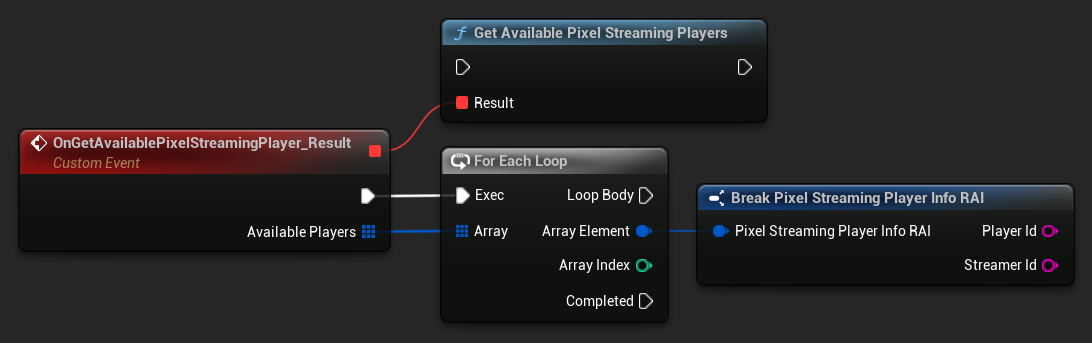
UPixelStreamingCapturableSoundWave::GetAvailablePixelStreamingPlayers(FOnGetAvailablePixelStreamingPlayersResultNative::CreateWeakLambda(this, [](const TArray<FPixelStreamingPlayerInfo_RAI>& AvailablePlayers)
{
    // Handle the list of available players
    for (const FPixelStreamingPlayerInfo_RAI& PlayerInfo : AvailablePlayers)
    {
        UE_LOG(LogTemp, Log, TEXT("Available player: %s on streamer: %s"), *PlayerInfo.PlayerId, *PlayerInfo.StreamerId);
    }
}));
- Blueprint
- C++
使用 Get Available Pixel Streaming 2 Players 节点
UPixelStreaming2CapturableSoundWave::GetAvailablePixelStreaming2Players(FOnGetAvailablePixelStreaming2PlayersResultNative::CreateWeakLambda(this, [](const TArray<FPixelStreaming2PlayerInfo_RAI>& AvailablePlayers)
{
    // Handle the list of available players
    for (const FPixelStreaming2PlayerInfo_RAI& PlayerInfo : AvailablePlayers)
    {
        UE_LOG(LogTemp, Log, TEXT("Available player: %s on streamer: %s"), *PlayerInfo.PlayerId, *PlayerInfo.StreamerId);
    }
}));
设置要从中捕获的播放器
当您需要从特定播放器进行捕获时:
- Pixel Streaming
- Pixel Streaming 2
- Blueprint
- C++
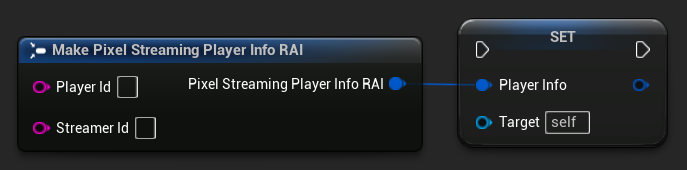
// Assuming PixelStreamingSoundWave is a reference to a UPixelStreamingCapturableSoundWave object
// and PlayerInfo is a FPixelStreamingPlayerInfo_RAI object from GetAvailablePixelStreamingPlayers

PixelStreamingSoundWave->PlayerInfo = PlayerInfo;
- Blueprint
- C++
使用 Set Player To Capture From 节点与您的 Pixel Streaming 2 Capturable Sound Wave
// Assuming PixelStreamingSoundWave is a reference to a UPixelStreaming2CapturableSoundWave object
// and PlayerInfo is a FPixelStreaming2PlayerInfo_RAI object from GetAvailablePixelStreaming2Players

PixelStreamingSoundWave->PlayerInfo = PlayerInfo;
如果留空 Player ID,声波将自动监听第一个连接的可用玩家。这是默认行为,适用于单玩家场景。
常见用例
语音聊天实现
您可以使用 Pixel Streaming 可捕获声波来实现远程用户与本地玩家之间的语音聊天:
- 为每个连接的玩家创建一个 Pixel Streaming 可捕获声波
- 设置一个系统来管理当前正在说话的玩家
- 使用 语音活动检测 系统来检测用户何时在说话
- 如果需要,使用 Unreal Engine 的音频系统对音频进行空间化处理
带语音识别的语音命令
您可以通过将此功能与 Runtime Speech Recognizer 插件结合,为远程用户实现语音命令识别:
- 使用 Pixel Streaming 可捕获声波从 Pixel Streaming 客户端捕获音频
- 将捕获的音频直接馈送到 Runtime Speech Recognizer
- 在您的游戏逻辑中处理识别出的文本
只需在 Runtime Speech Recognizer 示例中将标准的可捕获声波替换为 Pixel Streaming 可捕获声波(或 Pixel Streaming 2 可捕获声波),它就能与 Pixel Streaming 音频输入无缝协作。
录制远程用户音频
您可以录制远程用户的音频以供后续播放:
- 使用 Pixel Streaming 可捕获声波捕获音频
- 使用 导出音频 将捕获的音频导出到文件
- 保存文件以供后续使用或分析