导入音频
概述
在运行时导入音频的过程可以分解为以下几个步骤:
- 创建一个运行时音频导入器
- 绑定到所需的委托(OnProgress 和 OnResult)
- 从文件或缓冲区导入音频
- 播放从 OnResult 委托获取的导入后的音波(更多信息请参见此处)
请确保 Runtime Audio Importer 和 Sound Wave 实例不会因过早的垃圾回收而被销毁,可以通过使用 UPROPERTY()、TStrongObjectPtr 或任何其他防止对象被销毁的方法将它们分配给单独的变量来保持对它们的强引用。
支持的音频格式
Runtime Audio Importer 支持导入以下音频格式:
| 格式 | 描述 |
|---|---|
| MP3 | MPEG-1/2/2.5 音频层 I/II/III |
| WAV | 波形音频文件格式 |
| FLAC | 免费无损音频编解码器 |
| OGG VORBIS | 包含 Vorbis 音频的 Ogg 容器 |
| OGG OPUS | 包含 Opus 音频的 Ogg 容器 |
| BINK | Bink Audio |
| RAW (PCM) | 未压缩的脉冲编码调制音频数据(Int8、UInt8、Int16、UInt16、Int32、UInt32、Float32) |
导入音频时,您可以明确指定格式,也可以根据文件扩展名或内容使用自动格式检测。
流式音频导入
对于音频数据是增量接收的流式场景(例如,来自服务器、实时捕获或网络流),请考虑使用 Streaming Sound Waves。
此方法提供了一种连续的方式将音频数据追加到同一音波的缓冲区,使其适用于实时流或分块处理的大文件。更多详情请参阅 Streaming Sound Wave 文档。
基本实现步骤
1. 创建运行时音频导入器
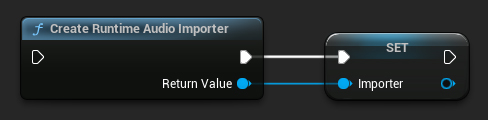
首先,您需要创建一个 Runtime Audio Importer 对象。您应确保垃圾收集器将其视为强引用。
- Blueprint
- C++
// UPROPERTY() is used here to prevent the object from being prematurely garbage collected
UPROPERTY()
class URuntimeAudioImporterLibrary* Importer;
Importer = URuntimeAudioImporterLibrary::CreateRuntimeAudioImporter();
2. 绑定到 OnProgress 委托
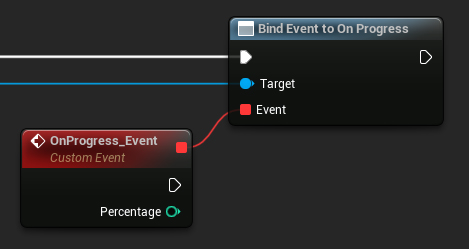
要跟踪导入音频数据的进度,您可以绑定到 OnProgress (蓝图) / OnProgressNative (C++) 委托。
- Blueprint
- C++
// Assuming Importer is a UE reference to a URuntimeAudioImporterLibrary object
// AddWeakLambda is used just as an example. You can use any other method to bind the delegate, such as AddUObject, AddUFunction, etc.
Importer->OnProgressNative.AddWeakLambda(this, [](int32 Percentage)
{
	UE_LOG(LogTemp, Log, TEXT("Import progress: %d"), Percentage);
});
这将允许您监控进度,并可以(例如)实现一个加载屏幕。
3. 绑定到 OnResult 委托
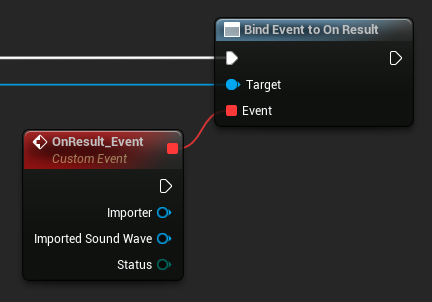
要在音频数据导入过程完成时收到通知并访问生成的声音波(Sound Wave)的引用,您必须绑定到 OnResult(蓝图)/ OnResultNative(C++)委托。
- Blueprint
- C++
// Assuming Importer is a UE reference to a URuntimeAudioImporterLibrary object
// AddWeakLambda is used just as an example. You can use any other method to bind the delegate, such as AddUObject, AddUFunction, etc.
Importer->OnResultNative.AddWeakLambda(this, [](URuntimeAudioImporterLibrary* Importer, UImportedSoundWave* ImportedSoundWave, ERuntimeImportStatus Status)
{
	UE_LOG(LogTemp, Log, TEXT("Import result: %s"), *UEnum::GetValueAsString(Status));
});
请确保导入的声波被垃圾回收器视为强引用,以防止不必要的过早垃圾回收。这可以通过在蓝图中将其作为单独的变量来实现。
4. 开始音频导入
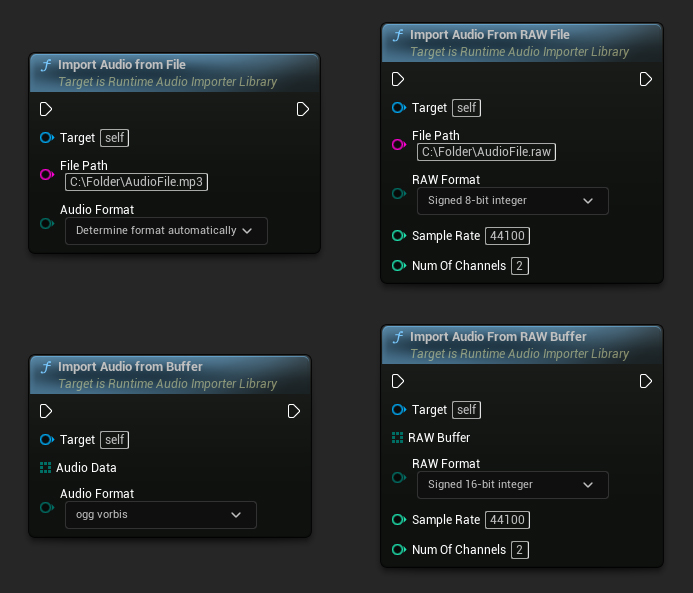
通过调用相关函数开始音频导入过程,该函数可以处理压缩和未压缩的音频数据格式。
- Blueprint
- C++
// Assuming Importer is a UE reference to a URuntimeAudioImporterLibrary object

// Import audio from a file
Importer->ImportAudioFromFile(TEXT("C:/Folder/AudioFile.mp3"), ERuntimeAudioFormat::Auto);

// Import audio from a buffer
TArray<uint8> AudioData = ...; // Fill the array with your audio data
Importer->ImportAudioFromBuffer(MoveTemp(AudioData), ERuntimeAudioFormat::OggVorbis);

// Import audio from a RAW file
Importer->ImportAudioFromRAWFile(TEXT("C:/Folder/AudioFile.raw"), ERuntimeRAWAudioFormat::Int8, 44100, 2);

// Import audio from a RAW buffer
TArray<uint8> RAWBuffer = ...; // Fill the array with your PCM int 16-bit audio data
Importer->ImportAudioFromRAWBuffer(MoveTemp(RAWBuffer), ERuntimeRAWAudioFormat::Int16, 44100, 2);
实用函数
查找音频文件
您可以扫描目录以查找支持的音频文件:
- Blueprint
- C++
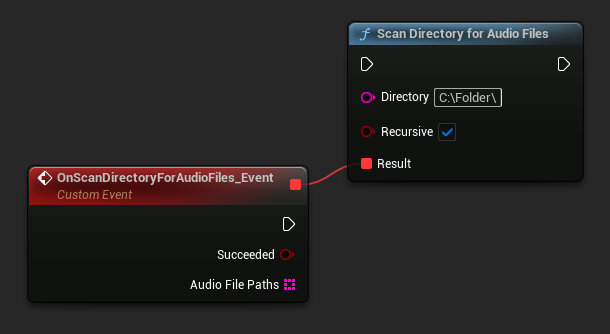
URuntimeAudioUtilities::ScanDirectoryForAudioFiles(TEXT("C:/Folder/"), true,
	FOnScanDirectoryForAudioFilesResultNative::CreateWeakLambda(this, [this](bool bSucceeded, const TArray<FString>& AudioFilePaths)
	{
		// Handle the result
	}));
完整示例
以下是一个导入音频的完整实现示例:
- 蓝图
- C++
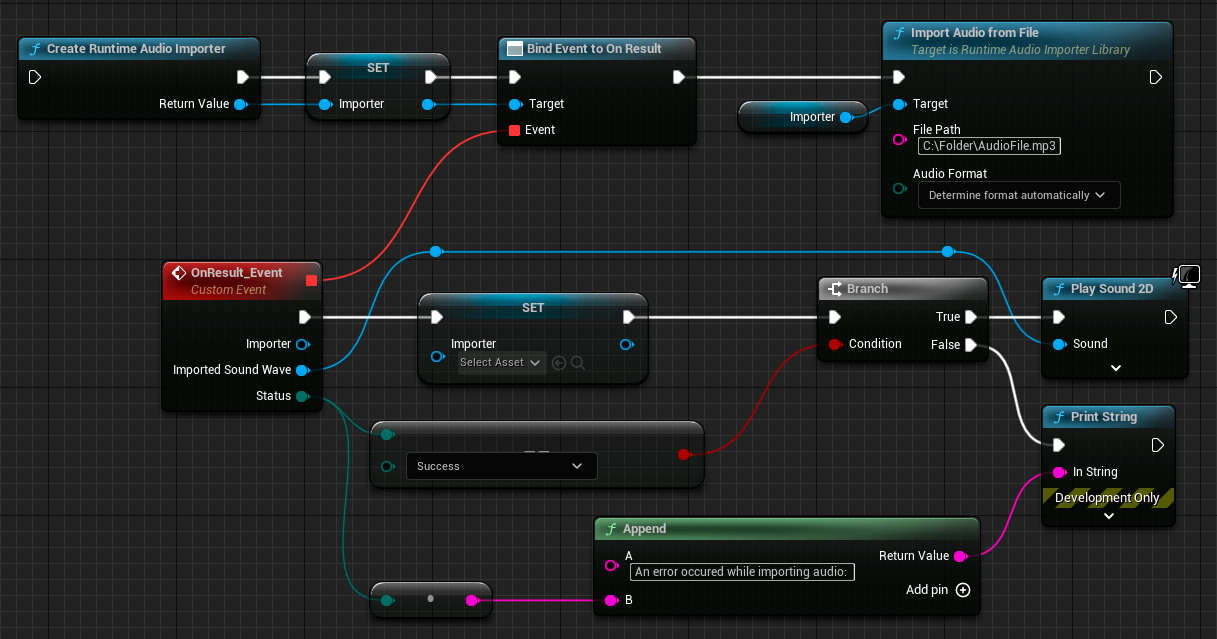
这是一个从文件导入音频的基础代码示例。
该示例使用了位于 EXAMPLEMODULE 模块中 UImportAudioClassExample 类内的 ImportAudioExample 函数。
要成功运行此示例,请确保将 RuntimeAudioImporter 模块添加到 .Build.cs 文件中的 PublicDependencyModuleNames 或 PrivateDependencyModuleNames,同时也添加到您项目的 .uproject 文件中。
#pragma once

#include "CoreMinimal.h"
#include "UObject/Object.h"
#include "ImportAudioClassExample.generated.h"

UCLASS(BlueprintType)
class EXAMPLEMODULE_API UImportAudioClassExample : public UObject
{
	GENERATED_BODY()

public:
	UFUNCTION(BlueprintCallable)
	void ImportAudioExample();

private:
	// Please pay attention to making the RuntimeAudioImporter a hard reference, such as using UPROPERTY(), to prevent it from being prematurely garbage collected
	UPROPERTY()
	class URuntimeAudioImporterLibrary* RuntimeAudioImporter;
};
#include "ImportAudioClassExample.h"
#include "RuntimeAudioImporterLibrary.h"

void UImportAudioClassExample::ImportAudioExample()
{
	RuntimeAudioImporter = URuntimeAudioImporterLibrary::CreateRuntimeAudioImporter();

	if (!IsValid(RuntimeAudioImporter))
	{
		UE_LOG(LogTemp, Error, TEXT("Failed to create audio importer"));
		return;
	}

	RuntimeAudioImporter->OnProgressNative.AddWeakLambda(this, [](int32 Percentage)
	{
		UE_LOG(LogTemp, Log, TEXT("Audio importing percentage: %d"), Percentage);
	});

	RuntimeAudioImporter->OnResultNative.AddWeakLambda(this, [this](URuntimeAudioImporterLibrary* Importer, UImportedSoundWave* ImportedSoundWave, ERuntimeImportStatus Status)
	{
		if (Status == ERuntimeImportStatus::SuccessfulImport)
		{
			UE_LOG(LogTemp, Warning, TEXT("Successfully imported audio with sound wave %s"), *ImportedSoundWave->GetName());
			// Here you can handle ImportedSoundWave playback, like "UGameplayStatics::PlaySound2D(GetWorld(), ImportedSoundWave);"
		}
		else
		{
			UE_LOG(LogTemp, Error, TEXT("Failed to import audio"));
		}

		RuntimeAudioImporter = nullptr;
	});

	RuntimeAudioImporter->ImportAudioFromFile(TEXT("C:/Folder/Example.mp3"), ERuntimeAudioFormat::Auto);
}