오디오 가져오기
개요
런타임에서 오디오를 가져오는 과정은 여러 단계로 나눌 수 있습니다:
- 런타임 오디오 임포터 생성
- 필요한 델리게이트에 바인딩 (OnProgress 및 OnResult)
- 파일 또는 버퍼에서 오디오 가져오기
- OnResult 델리게이트에서 얻은 가져온 사운드 웨이브 재생 (자세한 정보는 여기에서 확인)
Runtime Audio Importer와 Sound Wave 인스턴스 모두가 조기에 가비지 컬렉션되지 않도록 하려면, UPROPERTY(), TStrongObjectPtr 또는 객체가 파괴되지 않도록 방지하는 다른 방법을 사용하여 별도의 변수에 할당함으로써 강한 참조를 유지해야 합니다.
지원되는 오디오 형식
Runtime Audio Importer는 다음 오디오 형식의 가져오기를 지원합니다:
| 형식 | 설명 |
|---|---|
| MP3 | MPEG-1/2/2.5 Audio Layer I/II/III |
| WAV | Waveform Audio File Format |
| FLAC | Free Lossless Audio Codec |
| OGG VORBIS | Vorbis 오디오가 포함된 Ogg 컨테이너 |
| OGG OPUS | Opus 오디오가 포함된 Ogg 컨테이너 |
| BINK | Bink Audio |
| RAW (PCM) | 비압축 펄스 코드 변조 오디오 데이터 (Int8, UInt8, Int16, UInt16, Int32, UInt32, Float32) |
오디오를 가져올 때 형식을 명시적으로 지정하거나 파일 확장자 또는 내용을 기반으로 자동 형식 감지를 사용할 수 있습니다.
스트리밍 오디오 가져오기
오디오 데이터가 점진적으로 수신되는 스트리밍 시나리오(예: 서버, 실시간 캡처 또는 네트워크 스트림)의 경우 Streaming Sound Waves 사용을 고려하세요.
이 방법은 동일한 사운드 웨이브의 버퍼에 오디오 데이터를 지속적으로 추가할 수 있는 방법을 제공하여 라이브 스트림 또는 청크 단위로 처리되는 대용량 파일에 적합합니다. 자세한 내용은 Streaming Sound Wave 문서를 참조하세요.
기본 구현 단계
1. Runtime Audio Importer 생성
먼저 Runtime Audio Importer 객체를 생성해야 합니다. 가비지 컬렉터에 의해 강한 참조로 처리되도록 해야 합니다.
- Blueprint
- C++
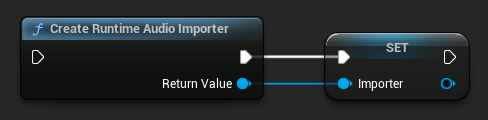
// UPROPERTY() is used here to prevent the object from being prematurely garbage collected
UPROPERTY()
class URuntimeAudioImporterLibrary* Importer;
Importer = URuntimeAudioImporterLibrary::CreateRuntimeAudioImporter();
2. OnProgress 델리게이트에 바인딩
오디오 데이터 임포트 진행 상황을 추적하려면 OnProgress (블루프린트) / OnProgressNative (C++) 델리게이트에 바인딩할 수 있습니다.
- Blueprint
- C++
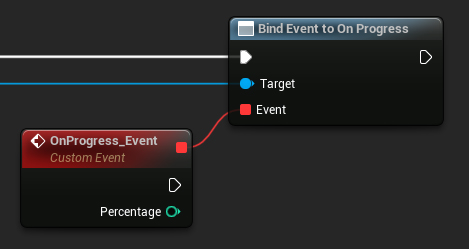
// Assuming Importer is a UE reference to a URuntimeAudioImporterLibrary object
// AddWeakLambda is used just as an example. You can use any other method to bind the delegate, such as AddUObject, AddUFunction, etc.
Importer->OnProgressNative.AddWeakLambda(this, [](int32 Percentage)
{
	UE_LOG(LogTemp, Log, TEXT("Import progress: %d"), Percentage);
});
이렇게 하면 진행 상황을 모니터링하고, 예를 들어 로딩 화면을 구현할 수 있습니다.
3. OnResult 델리게이트에 바인딩
오디오 데이터 임포트 프로세스가 완료되고 결과 사운드 웨이브의 참조에 접근할 수 있게 되면 알림을 받으려면 OnResult (블루프린트) / OnResultNative (C++) 델리게이트에 바인딩해야 합니다.
- Blueprint
- C++
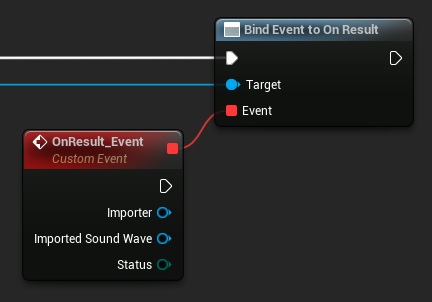
// Assuming Importer is a UE reference to a URuntimeAudioImporterLibrary object
// AddWeakLambda is used just as an example. You can use any other method to bind the delegate, such as AddUObject, AddUFunction, etc.
Importer->OnResultNative.AddWeakLambda(this, [](URuntimeAudioImporterLibrary* Importer, UImportedSoundWave* ImportedSoundWave, ERuntimeImportStatus Status)
{
	UE_LOG(LogTemp, Log, TEXT("Import result: %s"), *UEnum::GetValueAsString(Status));
});
가져온 사운드 웨이브가 원치 않는 조기 가비지 컬렉션을 방지하도록 가비지 컬렉터에 의해 강력한 참조로 처리되도록 하십시오. 이는 Blueprints에서 별도의 변수로 배치하여 수행할 수 있습니다.
4. 오디오 가져오기 시작
압축 및 비압축 오디오 데이터 형식을 모두 처리할 수 있는 관련 함수를 호출하여 오디오 가져오기 프로세스를 시작합니다.
- Blueprint
- C++
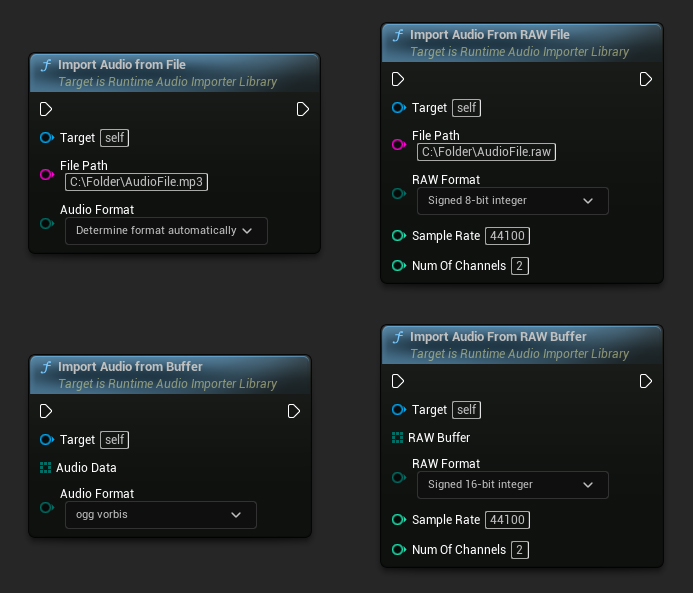
// Assuming Importer is a UE reference to a URuntimeAudioImporterLibrary object

// Import audio from a file
Importer->ImportAudioFromFile(TEXT("C:/Folder/AudioFile.mp3"), ERuntimeAudioFormat::Auto);

// Import audio from a buffer
TArray<uint8> AudioData = ...; // Fill the array with your audio data
Importer->ImportAudioFromBuffer(MoveTemp(AudioData), ERuntimeAudioFormat::OggVorbis);

// Import audio from a RAW file
Importer->ImportAudioFromRAWFile(TEXT("C:/Folder/AudioFile.raw"), ERuntimeRAWAudioFormat::Int8, 44100, 2);

// Import audio from a RAW buffer
TArray<uint8> RAWBuffer = ...; // Fill the array with your PCM int 16-bit audio data
Importer->ImportAudioFromRAWBuffer(MoveTemp(RAWBuffer), ERuntimeRAWAudioFormat::Int16, 44100, 2);
유틸리티 함수
오디오 파일 찾기
지원되는 오디오 파일을 디렉토리에서 검색할 수 있습니다:
- Blueprint
- C++
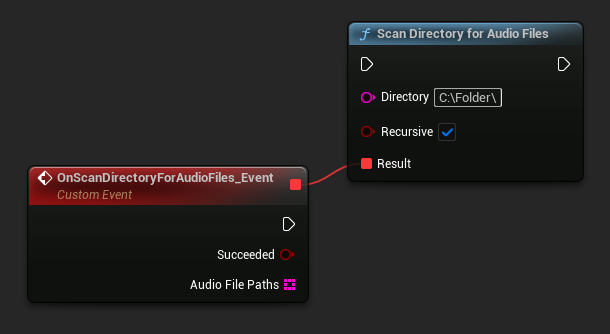
URuntimeAudioUtilities::ScanDirectoryForAudioFiles(TEXT("C:/Folder/"), true,
	FOnScanDirectoryForAudioFilesResultNative::CreateWeakLambda(this, [this](bool bSucceeded, const TArray<FString>& AudioFilePaths)
	{
		// Handle the result
	}));
완전한 예시
오디오를 임포트하기 위한 전체 구현 예시입니다:
- Blueprint
- C++

파일에서 오디오를 임포트하는 기본 코드 예시입니다.
이 예시는 EXAMPLEMODULE 모듈 내 UImportAudioClassExample 클래스에 위치한 ImportAudioExample 함수를 사용합니다.
예시를 성공적으로 실행하려면, 프로젝트의 .Build.cs 파일과 .uproject 파일에 RuntimeAudioImporter 모듈을 PublicDependencyModuleNames 또는 PrivateDependencyModuleNames에 추가해야 합니다.
#pragma once

#include "CoreMinimal.h"
#include "UObject/Object.h"
#include "ImportAudioClassExample.generated.h"

UCLASS(BlueprintType)
class EXAMPLEMODULE_API UImportAudioClassExample : public UObject
{
	GENERATED_BODY()

public:
	UFUNCTION(BlueprintCallable)
	void ImportAudioExample();

private:
	// Please pay attention to making the RuntimeAudioImporter a hard reference, such as using UPROPERTY(), to prevent it from being prematurely garbage collected
	UPROPERTY()
	class URuntimeAudioImporterLibrary* RuntimeAudioImporter;
};
#include "ImportAudioClassExample.h"
#include "RuntimeAudioImporterLibrary.h"

void UImportAudioClassExample::ImportAudioExample()
{
	RuntimeAudioImporter = URuntimeAudioImporterLibrary::CreateRuntimeAudioImporter();

	if (!IsValid(RuntimeAudioImporter))
	{
		UE_LOG(LogTemp, Error, TEXT("Failed to create audio importer"));
		return;
	}

	RuntimeAudioImporter->OnProgressNative.AddWeakLambda(this, [](int32 Percentage)
	{
		UE_LOG(LogTemp, Log, TEXT("Audio importing percentage: %d"), Percentage);
	});

	RuntimeAudioImporter->OnResultNative.AddWeakLambda(this, [this](URuntimeAudioImporterLibrary* Importer, UImportedSoundWave* ImportedSoundWave, ERuntimeImportStatus Status)
	{
		if (Status == ERuntimeImportStatus::SuccessfulImport)
		{
			UE_LOG(LogTemp, Warning, TEXT("Successfully imported audio with sound wave %s"), *ImportedSoundWave->GetName());
			// Here you can handle ImportedSoundWave playback, like "UGameplayStatics::PlaySound2D(GetWorld(), ImportedSoundWave);"
		}
		else
		{
			UE_LOG(LogTemp, Error, TEXT("Failed to import audio"));
		}

		RuntimeAudioImporter = nullptr;
	});

	RuntimeAudioImporter->ImportAudioFromFile(TEXT("C:/Folder/Example.mp3"), ERuntimeAudioFormat::Auto);
}